Found the tender? Get the admin pack under control.
TenderKit helps South African supplier teams track CSD, SARS, CIPC,
B-BBEE and bid documents, assign follow-ups, and prepare a
ZIP-ready tender pack before deadline day.
TenderKit does not find tenders, submit bids, or verify legal or
compliance status. Always confirm final requirements in the tender
documents and official portals.
Set up a workspace in minutes
Built for teams that already found a tender
Track checklist status, owners, uploads and ZIP preview
Keep using the checklist on this page, or get the PDF and a short
tender admin readiness email sequence for teams preparing their
first TenderKit workspace.
TenderKit uses this only to send the checklist and relevant tender
admin follow-ups. Do not enter tender-confidential information here.
How TenderKit helps
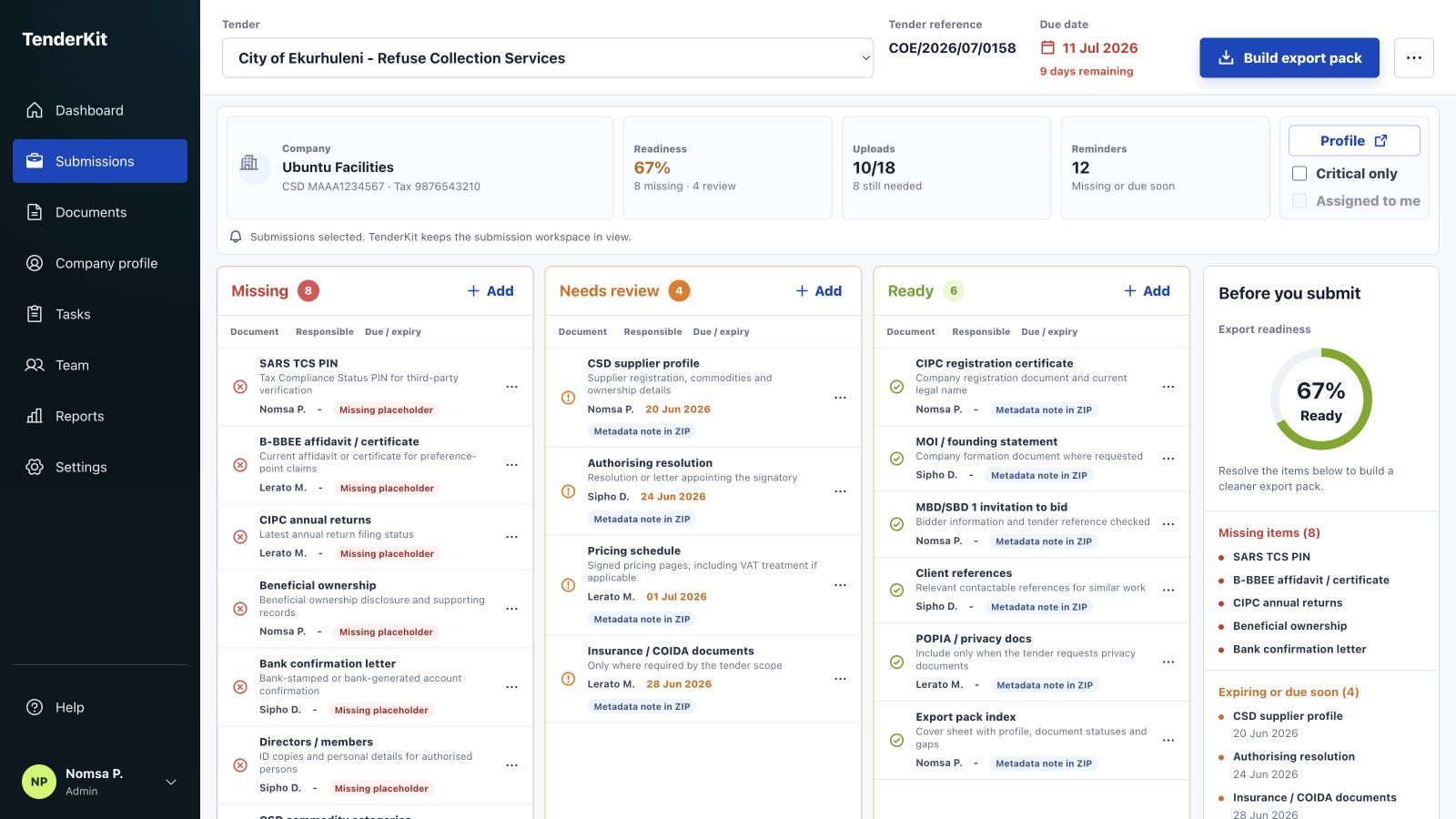
Turn the checklist into a working tender admin board
TenderKit keeps checklist status, document storage, owner
follow-ups and ZIP pack preview in one workspace, so the team can
see what is missing before final review.
Track missing, review and ready items before relying on the final pack.
Checklist
What to track before tender submission
Use the official tender document as the source of truth. This
checklist helps your team organise recurring supplier admin and
bid-specific files that commonly need a status, owner and final
review.
Tender basics
Capture the details that determine the working deadline and final submission format.
Tender name, reference number and buyer or organ of state.
Closing date, closing time and internal final-review date.
Submission method, portal link, delivery address or email channel.
Required final format: ZIP, PDF upload, email pack or physical pack.
Supplier profile basics
Keep the identifiers your team repeats across supplier admin and bid forms.
Registered legal name, trading name and company registration number.
VAT number and tax number where applicable.
CSD supplier number and Unique Registration Reference Number if required.
Authorised signatory, contact person, phone number and email address.
CSD readiness
CSD registration includes supplier identification, contacts, addresses, banking, tax, directors or members, commodities and B-BBEE information where relevant.
Current CSD supplier profile report.
Commodity categories and delivery locations checked against the bid.
Bank, tax, contact and address details checked before submission.
Director or member information reviewed for consistency with bid forms.
SARS readiness
Track the tax documents and reminders your team needs to verify through official SARS channels before relying on them.
Tax compliance status PIN or tender-specific tax proof requested by the bid.
Tax number and VAT registration details where applicable.
Reminder to verify tax compliance close to submission day.
Owner assigned for any SARS follow-up before the internal review deadline.
CIPC readiness
Keep company registration and maintenance records visible when a tender asks for company proof.
Company registration certificate or relevant enterprise document.
Annual returns status checked where relevant.
Beneficial ownership records or notes tracked where applicable.
Director, member or signatory authority documents matched to bid forms.
B-BBEE readiness
Track proof and validity dates, then confirm the exact requirement in the tender documents.
B-BBEE affidavit or certificate stored with validity date.
Entity-size and scorecard assumptions checked before use.
Preference-point or empowerment forms matched to the bid instructions.
Owner assigned if the document needs renewal, correction or review.
Bid-specific documents
Separate repeat supplier admin from forms that only exist for this tender.
Signed bid forms, declarations and compulsory returnable schedules.
Pricing schedule, VAT treatment and supporting calculations.
Technical response, references, project examples or capability statement.
Resolution, power of attorney or signatory letter if the bid asks for it.
Final pack review
Check the pack as work in progress before anyone relies on the final file.
Missing, needs-review and ready items separated clearly.
Every unresolved item has an owner and due date.
File names and ZIP contents reviewed against the official tender document.
Final submission method confirmed before download or upload.
Tendering qualifications
What qualifications do you need for tendering?
There is no single qualification that makes every supplier tender-ready.
Each tender document sets its own requirements, but most South African
supplier teams need to organise company records, supplier registration,
tax status, B-BBEE evidence and bid-specific proof before final review.
Company and supplier registration
Keep CIPC records, CSD supplier details, contact information,
banking records and authorised signatory proof easy to review
against the bid forms.
Tax, B-BBEE and compliance documents
Track tax-compliance evidence, B-BBEE affidavits or certificates,
declarations and validity dates, then confirm the exact status on
the official portals.
Bid-specific capability proof
Add pricing schedules, technical responses, references, project
examples and compulsory returnable documents requested by the
tender itself.
Capture the tender name, reference, buyer and deadline so every follow-up belongs to the right bid.
2
Sort items by status
Mark documents as missing, needs review or ready, then assign owners for unresolved items.
3
Review the ZIP contents
Preview what will be included, what remains missing and what needs a final check before submission.
Official sources
Keep official portals as the source of truth
TenderKit helps organise admin readiness only. Use these official
sources and the tender document itself to confirm the exact
requirements, status checks and submission rules for each bid.
Start a workspace when you have a tender to prepare. TenderKit gives
your team checklist status, document notes, hosted uploads, owner
follow-ups and ZIP preview in one focused place.